Automatic DJ for Apple MusicApple Music の自動DJアプリ

Everyone's music.
One endless set.
みんなの曲で、
止まらないDJ。

Add your friends' and family's Apple Music playlists, press Start, and BeatShuffle takes turns song by song — so everyone's favorites keep flowing, at the length you choose. 友だちや家族の Apple Music プレイリストを登録して、スタートを押すだけ。1曲ずつ順番に、決めた長さで回していくから、全員の“好き”が途切れず流れます。

Free to start · Requires an Apple Music subscription · iPhone 無料で始められます ・ 再生には Apple Music のサブスクリプションが必要です ・ iPhone 対応

How it works使い方

Three steps to your DJ set. 3ステップで、みんなのDJセット。

1

Add playlistsプレイリストを追加

In Apple Music, open any playlist or album, tap Share, and choose BeatShuffle. Or paste the link. Give each one an owner name — “Yuki”, “Dad”, “Road-trip mix”. Apple Music でプレイリストやアルバムを開き、共有 → BeatShuffle を選ぶだけ。リンクの貼り付けでもOK。「ゆき」「パパ」など持ち主の名前を付けられます。
2

Choose the length再生時間を決める

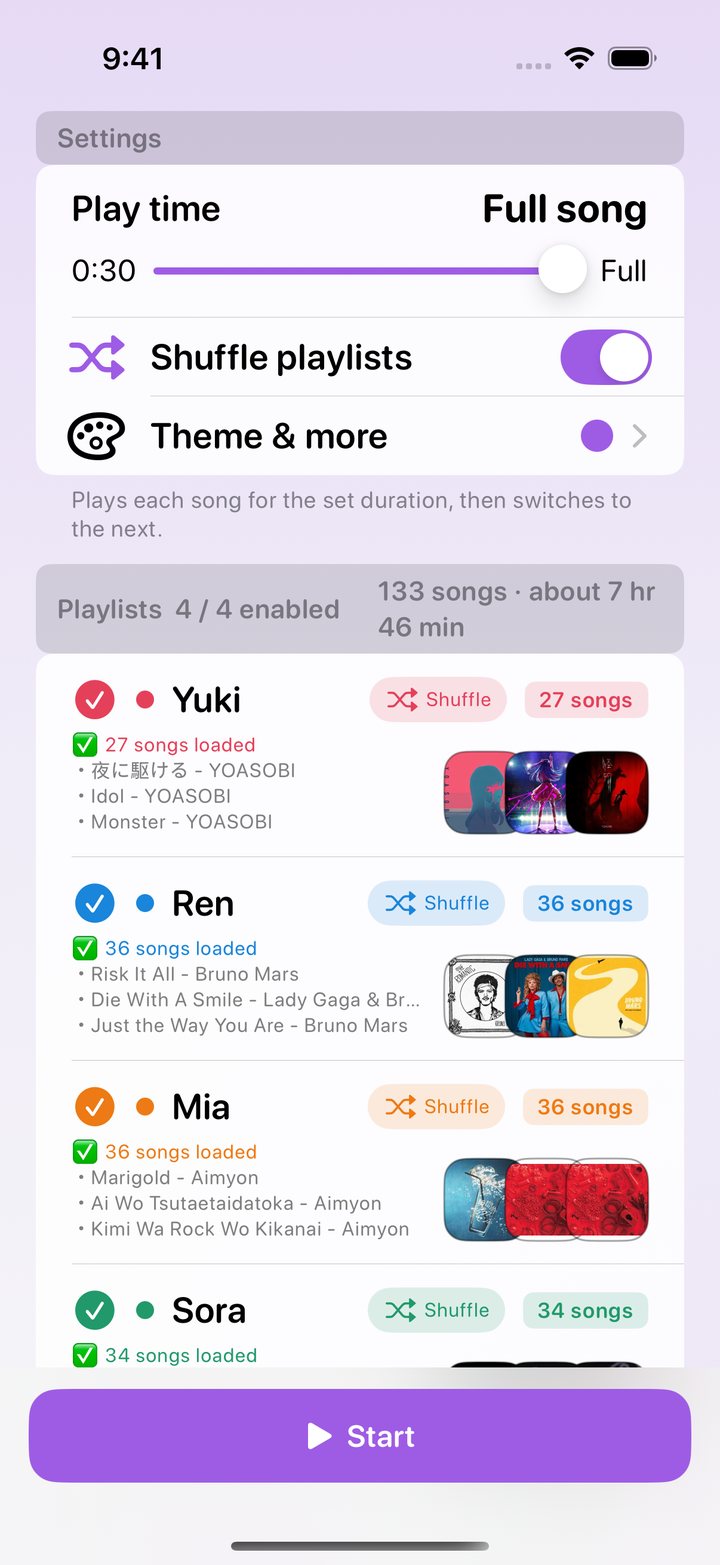
Play 30 seconds up to 5 minutes of each song, in 30-second steps — or let every song run to the end. Shuffle playlists or keep them in order. 1曲あたり30秒〜5分を30秒刻みで。最後まで流す設定もあります。プレイリストの順番はシャッフルも固定も選べます。

3

Tap Startスタートを押す

BeatShuffle picks the next song from the next person's playlist, again and again. Now playing and up next always show whose song it is. 次の人のプレイリストから次の1曲を、順番に自動で選曲。再生中も次の曲も「誰の曲か」が名前と色でわかります。

Takes turns順番に回す

No one hogs
the aux cord.
誰かの曲ばかり、
にならない。

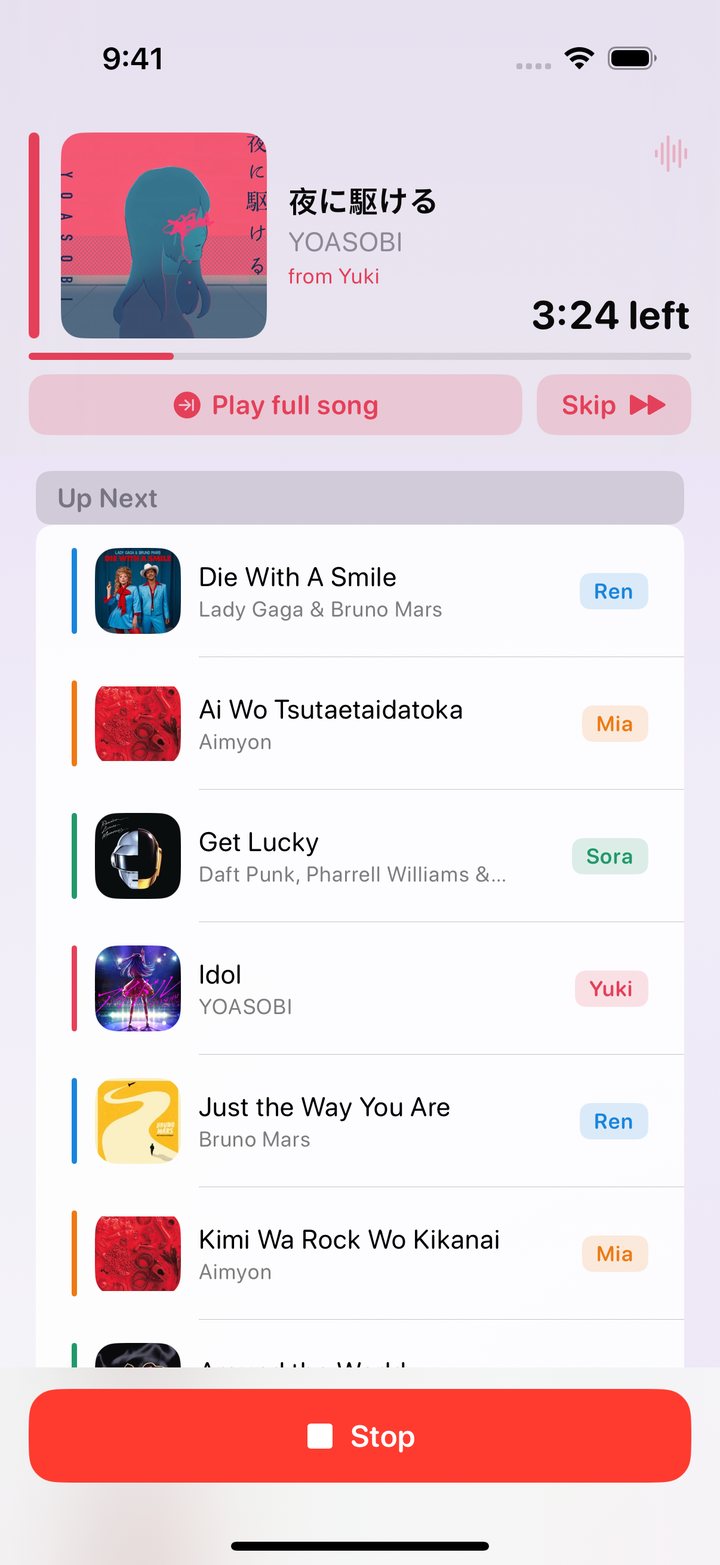
Songs rotate fairly between everyone's playlists. Each person gets a color, so you can see who picked the current track and who's up next. 登録したプレイリストから公平に1曲ずつ。人ごとに色が付くので、今の曲を選んだのは誰か、次は誰の番かがひと目でわかります。

  • Owner name and color on every songすべての曲に持ち主の名前と色
  • “Play full song” to extend a great oneいい曲は「最後まで再生」でその場で延長
  • Skip anytime — the next person is readyいつでもスキップ。次の人の曲へ
Now playing screen
Set up in secondsかんたん準備

Every playlist,
at a glance.
全員の曲を、
ひと目で。

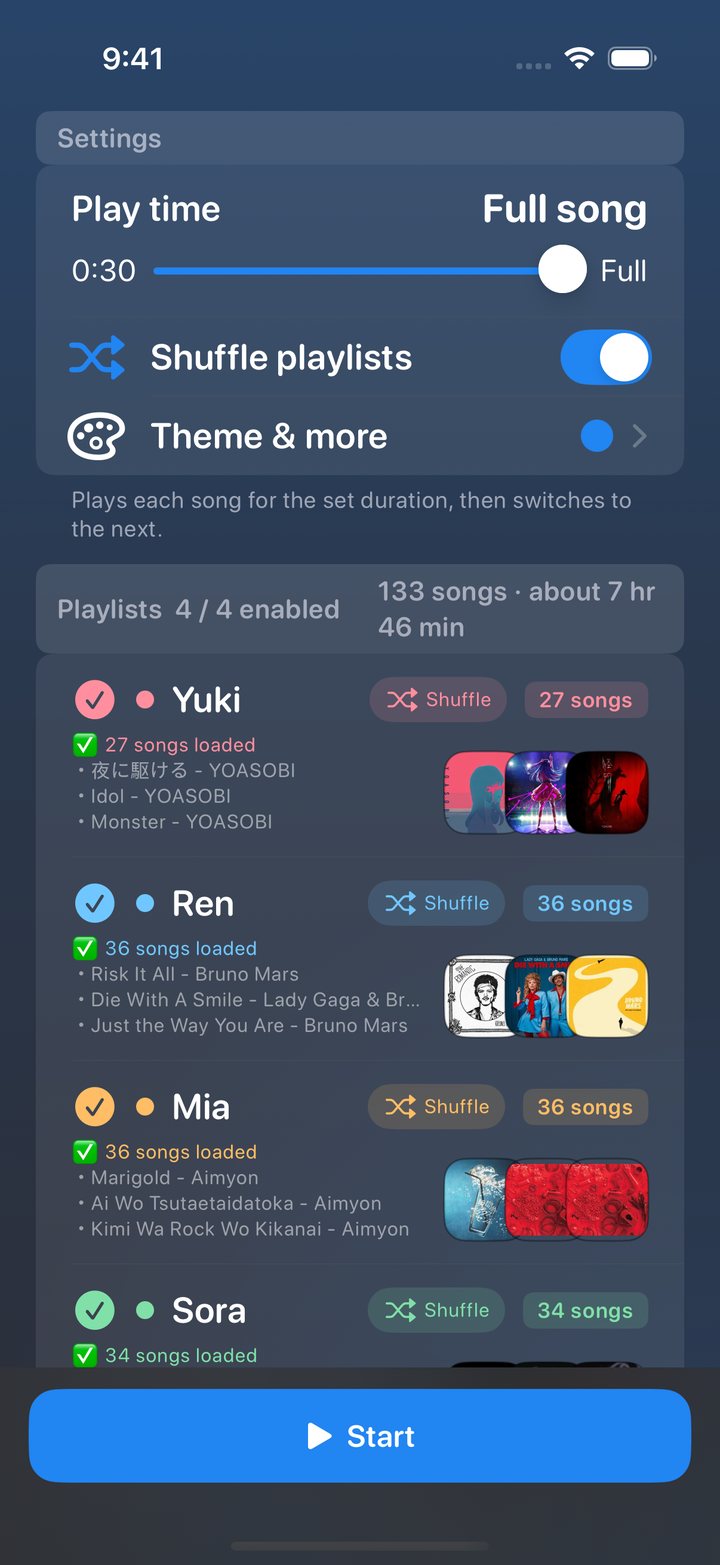
See how many songs each playlist brings, preview the artwork, and turn playlists on or off for tonight's mood. The total play time is calculated for you. プレイリストごとの曲数やジャケットを一覧で確認。今日の気分に合わせてオン・オフでき、全体のおおよその再生時間も表示されます。

  • Playlists and albums both workプレイリストもアルバムもOK
  • Shuffle or in-order songs, per playlist曲順はプレイリストごとにシャッフル/順番
  • Add straight from the iOS Share sheetiOS の共有シートから直接追加
Playlist list screen
Drive modeドライブモード

Turn sideways.
Big, easy controls.
横にすれば、
大きな操作画面に。

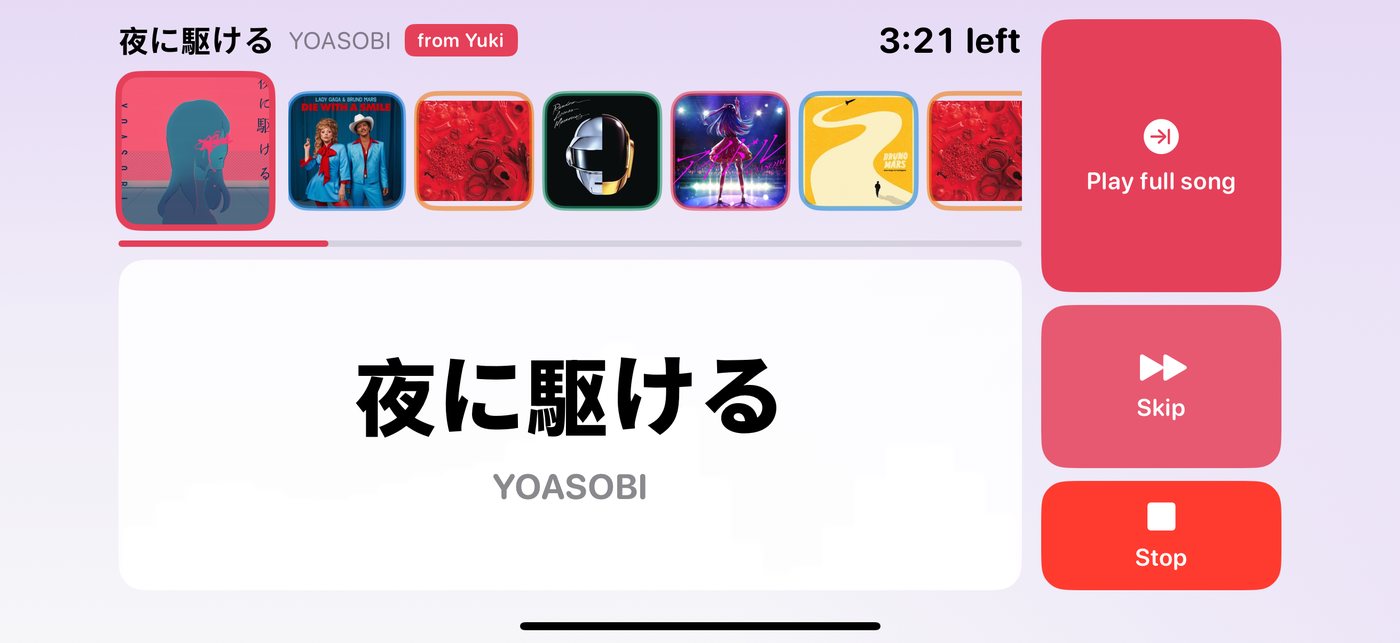
Rotate your iPhone and the player switches to a landscape layout with large titles and buttons — easy to use from the passenger seat, with what's next lined up as artwork. iPhone を横向きにすると、曲名とボタンが大きな横画面に切り替わります。助手席からでも迷わず操作でき、次に流れる曲もジャケットで並びます。

Landscape drive mode
Themes & skinsテーマとスキン

Seven colors.
Seven skins.
虹の7色と、
7つのスキン。

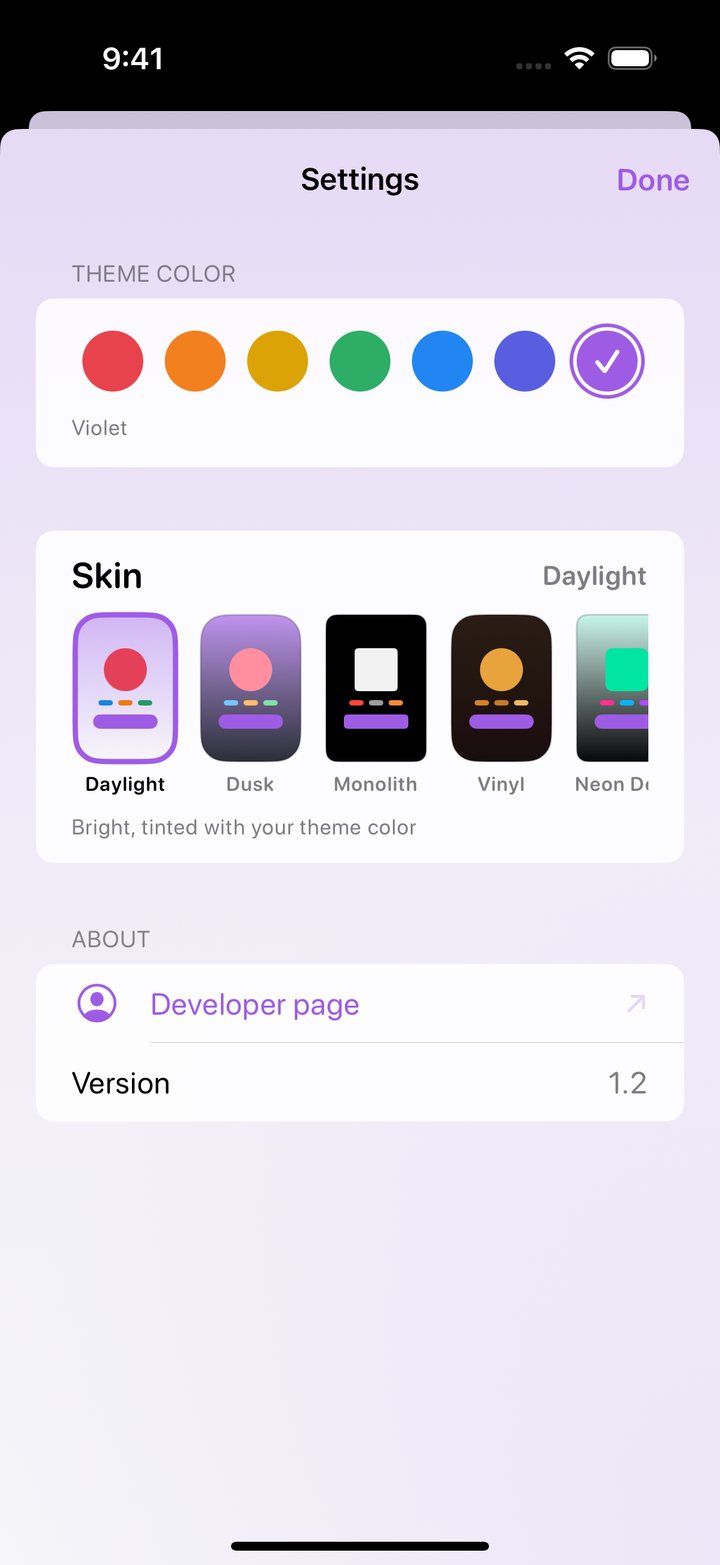
Pick an accent from seven rainbow colors, then choose a skin: bright Daylight, easy-on-the-eyes Dusk, or go retro with Vinyl and Neon Deck. Try the colors here — this page follows along. テーマカラーは虹の7色から。スキンは明るい Daylight、目にやさしい暗めの Dusk、レコード風の Vinyl や DJ ミキサー風の Neon Deck など。下の色を押すと、このページの色も変わります。

Dusk skin
Theme settings
DaylightBright, tinted with your color明るく、テーマカラーで色づく
DuskSoft dim tones落ち着いた暗めのトーン
MonolithPure black真っ黒に3色だけ
VinylRecords & amberレコードと温かいアンバー
Neon DeckDJ mixer consoleDJミキサー風
GlassTranslucent layersやわらかな半透明
EditorialLight, printed page明るい紙面風
Pricing料金

Free to try.
Yours to keep.
まずは無料で。
気に入ったら買い切り。

To startはじめに

30 min free30分無料

Every new install starts with free play time. Unused time carries over.インストール直後から無料で再生できる時間つき。使い切るまで持ち越せます。

Anytimeいつでも

+30 min per ad広告で+30分

Watch a short ad to add another 30 minutes whenever you need it.短い広告を見るたびに、無料時間が30分ずつ増えます。

Premiumプレミアム

One-time purchase買い切り

Unlimited play time, up to 16 playlists and no ads. No subscription — restore anytime with the same Apple ID.再生時間無制限、プレイリスト最大16個、広告なし。サブスクではありません。同じ Apple ID でいつでも復元できます。

FAQ

Questionsよくある質問

Do I need Apple Music?Apple Music は必要ですか?

Yes. BeatShuffle plays songs through Apple Music, so an active Apple Music subscription is required for playback. If you're not subscribed, the app shows Apple's official sign-up sheet.はい。曲は Apple Music で再生するため、再生には Apple Music のサブスクリプションが必要です。未加入の場合はアプリ内で Apple 公式の登録案内が表示されます。

Can I use my friends' playlists?友だちのプレイリストも使えますか?

Any public Apple Music playlist or album link works. Ask friends to share their playlist link, then add it with their name.公開されている Apple Music のプレイリストやアルバムのリンクなら追加できます。友だちにリンクを送ってもらい、名前を付けて登録してください。

Is it good for road trips?ドライブでも使えますか?

The large landscape layout is designed so passengers can run the music easily. Please don't operate your phone while driving.横向きの大きな画面は、同乗者が操作しやすいように作っています。運転中のスマートフォン操作はおやめください。

What data do you collect?どんなデータを集めていますか?

Your playlists and settings stay on your device. Purchases and ads use RevenueCat and Google AdMob. See the Privacy Policy for details.登録したプレイリストや設定は端末内に保存されます。購入管理と広告に RevenueCat と Google AdMob を使用しています。詳しくはプライバシーポリシーをご覧ください。

Press Start.
Let everyone DJ.
スタートを押して、
みんなでDJ。

BeatShuffle is available now on the App Store for iPhone.BeatShuffle は App Store で配信中です(iPhone)。

Download on theダウンロードApp Store